

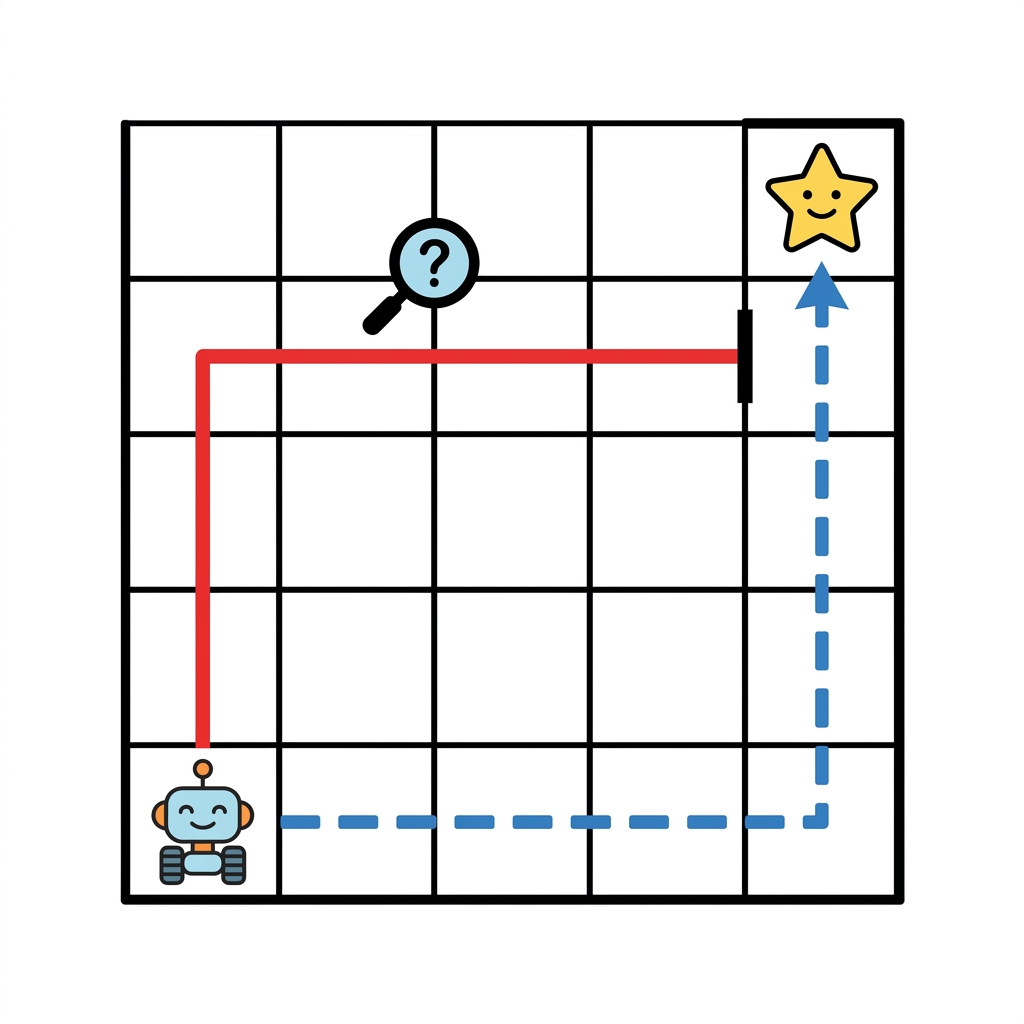
Building strong logic skills is essential in first grade computer science. One specific robot path consists of four steps that turn left, move forward, turn right, and move forward again. If a student misses one command in that sequence, the entire program fails to reach the destination. In this Fixing the Robot Path lesson, your students work through exactly that kind of challenge to understand why computers do exactly what they are told, even when those instructions lead to a wall instead of a finish line. This is a foundational step in early computer science because it teaches students that a mistake in the code is not a failure of character, but a logic puzzle waiting to be solved.
As you move through your grade 1 computer science curriculum, this lesson functions as a bridge between understanding basic movement and writing complex programs. The primary objective is straightforward: I can find and fix mistakes in a path. Students look at a set of commands and have to determine which move takes the robot off course. If they cannot spot the error here, they will definitely struggle when you introduce loops later on. It is much easier to debug a simple sequence of four movements than it is to untangle a repeating loop that runs for ten iterations. I find that once a student learns to trace the robot path with their finger, their success rate with debugging for first grade computer science skyrockets.
The standard behind the logic
The core standard here is CA.CS.K-2.AP.16. This is the California-adopted standard that expects students to debug errors in an algorithm or program that includes sequences and simple loops. When we look at this requirement, it asks for more than just fixing a mistake. It asks for the ability to look at an existing structure, test it against a set goal, and make a precise change to get the desired result. This standard is taught with consistent rigor in Capistrano Unified, Riverside Unified, Whittier City School District, and Norwalk-La Mirada Unified, proving that the foundation for logical thinking is a shared priority across our state.
The standard asks that students handle both sequences and loops. While this specific lesson focuses heavily on the sequence portion, it prepares them for that move into simple looping patterns. In my experience, the biggest hurdle for students is the idea that the computer is not wrong, the programmer is. They want to blame the robot for being broken, but the standard mandates they take ownership of the algorithm. By focusing on identifying where the sequence goes awry, they start to see their own coding logic with a critical eye. They learn to value the precision of a command, which makes them better writers and math students in the long run.
Vocabulary and classroom application
To help students talk about their work, you should emphasize a few key terms during the fifteen minutes you spend on this lesson. The term algorithm is central here, defining it as a series of instructions to accomplish a task. You will also use the word debug to describe the process of finding and fixing errors in an algorithm. These are the tools they need to articulate their process. When a student says, my algorithm was wrong because I had a right turn instead of a left turn, they have met the cognitive load of the standard far better than a student who just guesses until the robot moves correctly.
You can use this lesson as a quick whole-class warm-up or as a targeted intervention for a student who missed the week of instruction on sequential logic. It also works quite well for an independent study session where you want to gauge if a student can work through a problem without your direct help. I find it is also a perfect fit for a substitute day because the instructions are so clear that students can jump into the work immediately. You do not need to over-explain the concepts. Let the robot path examples speak for themselves. The less you interfere, the more the student actually learns to rely on their own internal debugging process.
Where students slip up
The most common point of failure I see is a student who changes the entire sequence instead of identifying the specific command that caused the error. If the robot goes left when it should go right, they want to start over from the very first block of code. This is usually because they lack confidence in tracing the path. If you notice this happening, walk them back to the start. Ask them to put a finger on the robot and walk through the commands step by step until the robot hits the wrong spot. That is where they stop. That is where they fix. They do not need to delete their entire work, they just need to swap the direction of that one single step.

If you treat debugging as a standard part of every computer science day, students stop feeling bad about making errors. They start looking forward to the challenge of the fix. This lesson provides that safe space to build that resilience. Keep the focus on the sequence of moves and the goal of the robot reaching its destination. When they succeed, they own the logic that got them there. That sense of ownership is what keeps them engaged when the coding gets harder in later grades. Once they understand that a mistake is just a piece of data they haven’t finished processing yet, their growth becomes exponential.
Related lessons

Being Kind Online, Teaches students how to treat others well on internet platforms

Making Patterns, Helps learners identify and continue repeating sequences of visual items
Counting to One Hundred, Covers strategies for counting numbers in order up to one hundred